How to Create Twitter Lists

If your Twitter feed is anything like mine..IT IS WILD! I have a tough time keeping up with things as they fly past on my screen. Sadly, I seem to miss a good number of tweets that I would have wanted to see in the chaos…until now…
Did you know that you can create your own lists in Twitter? This means a couple of things. First, you can have a list for just your personal friends or family members. How about a list of bloggers attending the next convention? My husband has a list for the members of our congregation.
With Twitter lists, you will be able to see small groups within your overall feed. And..it is easy to setup!
#1 – Get to your main Twitter page
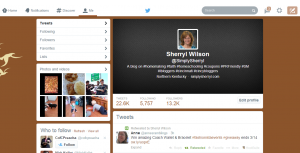
#2 Click on the little setting / gear icon next to your message and feather

#3 Once drop down menu opens, click on Lists
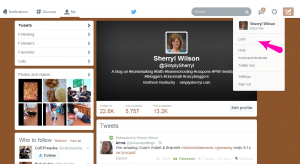
#4 A screen will pop up that shows the lists you are currently subscribed to, if any.. click Create list

#5 Fill in the boxes. Name your List, enter description of group (optional but helps) and decide if you want your list to be public or private. The difference is if you want others to be able to follow/subscribe to your list. Then click save list

#6 Woohoo you have a Twitter list! Now you can add others by either typing in their name, or by looking at the people you follow and clicking on the little setttings/gear icon.

Option 1 works whether you are following the brand/company or person.
Option 2 only works for those that you are currently following. So if you are adding bloggers and brands for the next convention, option one would be the method to use.
To add people to your list that you are following, click on the shadow next to the following button and then click on Add or remove from lists

Chose which lists you would like to have this person/brand be included on.
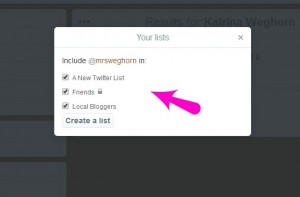
Simple huh?
Ok, so now you have a list or two, three… When you are looking for information on a particular group (your list) click on the list name from your main page. You will see all the tweets that this selected group have been posting.

From this screen you can also send messages to any of the members of the group.
I find using a list increases the interaction as I can focus on one group at a time. I usually rotate through the groups as I get online, retweeting and sending shout outs to list members.
Another great way to increase your Twitter interaction with your readers is to use Easy Tweet. The plugin allows you to place “ready to tweet” links that your readers can just click on! Just like the one above this paragraph! It has increased my post shares by at least 25%! Make sure to check it out!
Anther great post about twitter. I will definitely be creating some lists and getting more organized.
Thanks for this tip. Lists make it SO much easier to keep up with tweets!
I’ve only started one list since starting Twitter a couple of years ago but I really want to create more. Thanks for the detailed instructions!
Great tip to create twitter lists. Keep them coming!
I love list! I use one for my Facebook, but didn’t realize I could do that for Twitter as well. This will help organize my life a bit more. Thanks.
This is so helpful I am pinning! I am just starting to use twitter.
Great post! I’ve been working on getting all of my social media organized and I honestly didn’t know how to create the lists!! This will be added to my to do list! 🙂